


Great Weather Alarm - Radar
3.43.00 Reviews
App Specs
- Version
- 1.0.1
- Updated On
- License
- Free
- Downloads
- 10,000+
- Developer
- GoFish Apps
- Categories
- Weather
- Platform
- Android
Screenshots
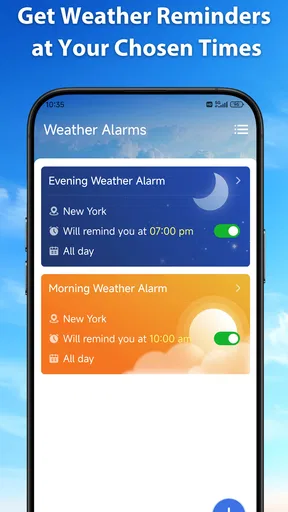
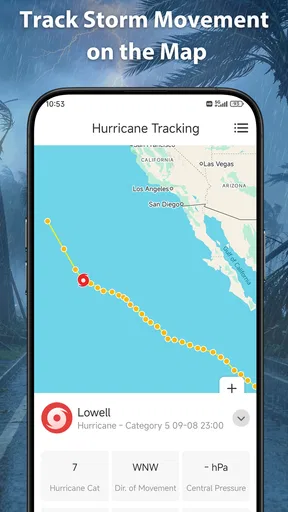
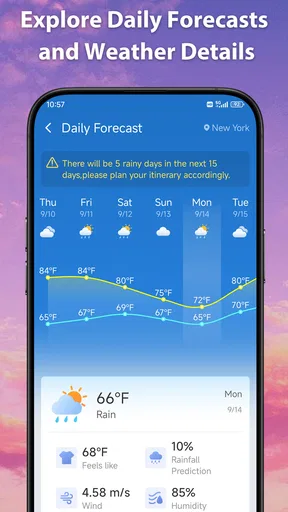
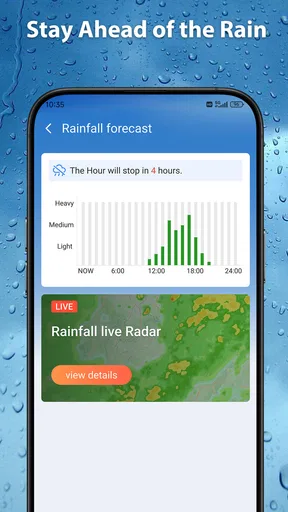
 Analysis by AppCompare
I tend to keep a weather app only if it changes a small daily decision: whether to take a coat, leave earlier, or move a walk indoors. Great Weather Alarm - Radar has an appealing starting point for that routine: it puts weather forecasts, radar and alerts within quick reach from the home screen. The real test, though, is whether that convenience stays useful after the first few days, rather than becoming another icon I forget to open.
A useful first-week test
For the first few days, I would avoid treating the app as something to explore for its own sake. Instead, I would use it at the same decision points I already have: before getting dressed, before leaving home, or while deciding whether an outdoor plan needs a backup. That makes it easier to judge the central question: does a faster weather check actually reduce friction in my day?
A simple test is to notice whether the forecast, radar or an alert changes what you do. If you check before a walk and take a light jacket because the conditions look uncertain, the app has helped even if the weather turns out fine. If you open it several times but make no different decision, the extra check may not be adding much. I find that distinction more useful than judging a weather app by how much time I spend looking at it.
Quick checks are the first-week appeal
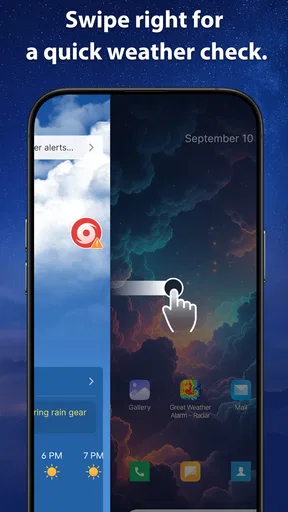
As a weather app from GoFish Apps, Great Weather Alarm is built around a familiar need: getting a quick sense of conditions without making weather a project. Its emphasis on a home-screen shortcut suits people who check the sky in brief moments, such as while getting dressed or just before heading out. That is a more practical promise than simply offering another place to read a forecast.
In the first week, I would judge it by how well it fits into those existing pauses. A glance before a school run, a commute or a dog walk can be more valuable than a detailed forecast opened only when plans are already disrupted. Radar and alerts also suggest a useful progression: check the outlook first, then look more closely when changing weather might affect the next few hours.
The app is free, so trying it does not require a purchase decision. It has reached over 10,000 installs, and its average rating is 3.4 from around 20 ratings. That is a modest early audience rather than a clear consensus, so I would treat the numbers as context, not proof that the app will suit every location or routine. Its content rating is Everyone, which makes it broadly suitable for general use.
Where a fast check helps most
One useful habit is to check once when planning the day and again just before leaving, rather than repeatedly refreshing a forecast. For example, if I have an outdoor appointment later, the first look helps me choose clothing, while a later radar check can help me decide whether to bring an umbrella or shift my departure. The benefit is not that an app can remove uncertainty; it is that a quick view can make a practical decision easier.
Worth Reading Before You Choose

Baby Panda World Brings Quick Play to Modern Phones, but Its Game Library Feels Busy

ESPN’s Live Game View Makes Following Close Games Easier

QuizzLand Review: A Good Fit for Short Trivia Breaks, Not Every Player

Basketball Stars: Multiplayer Is Fast, but Can It Recover When Matches Go Wrong?

WEBTOON Turns Phone Updates Into a Better Reading Routine

Link to Windows Runs on Shared Habits, Not Social Feeds
For someone who already has a weather widget or a built-in forecast, the case for adding this app depends on whether its home-screen access and alert approach feel more convenient. If they do, it may earn a place in the daily routine. If opening it feels like an extra step, the default weather option may be enough.
What keeps it useful after the novelty
Weather apps often feel compelling at first because forecasts and radar invite exploration. Long-term value is less about browsing and more about whether the information helps repeatedly with the same decisions. Great Weather Alarm is best suited to people who can connect a quick check to a real habit: checking before a commute, planning outdoor errands, or deciding whether a walk is likely to be comfortable.
A practical workflow is to use the forecast as a planning aid and radar as a closer look when timing matters. Those views answer different questions. The forecast helps with the broad shape of the day; radar is more relevant when I am about to go out and want to understand nearby conditions. Treating them as complementary avoids the common trap of staring at a detailed map when all I need is a simple yes-or-no clothing decision.
Alerts can add recurring value when they give a timely reason to reconsider plans. They are less useful if they interrupt for conditions that do not affect my day, so I would pay attention to whether alerts feel actionable rather than merely frequent. A notification should prompt a decision, not become background noise. If alerts are easy to ignore, the app’s strongest ongoing contribution may instead be its fast access to a forecast and radar.
Small habits that reduce friction
I would make the home-screen entry point part of a specific routine, such as checking the weather while packing a bag. That is more likely to last than relying on memory to open an app at random. It also makes it easier to tell whether the shortcut is genuinely useful: if I use it regularly at the same moment, it has earned its space; if I keep opening a different weather source, convenience is not actually better.
Another worthwhile habit is to check the app before making plans that are hard to change, not every time the sky looks different. A forecast is a guide, while conditions can shift; radar is most useful when the question is immediate. This distinction keeps the app in a supporting role and avoids treating any one screen as a guarantee.
For local outdoor plans, I would also compare what the app shows with what I can observe outside. A quick glance through a window is often enough to confirm whether a forecast matters right now. The app is most valuable when it extends that observation—helping anticipate what is approaching—rather than replacing common sense.
A realistic day-to-day workflow
Imagine I have errands to run after work and a short walk planned before dinner. In the morning, I would use the forecast to decide whether the walk seems sensible and pack suitable clothing. Before leaving work, I would look at radar if the timing of nearby weather could affect whether I walk first or go straight home. If an alert arrives, I would ask whether it changes that plan, rather than treating every notification as a command to check again.
This kind of sequence is where the combination can earn its place: forecast for broad planning, radar for a near-term decision, and alerts as a nudge when conditions may require attention. It is not a reason to monitor the app all day. In fact, deciding in advance when to check can make the app more useful by keeping weather from taking over a routine.
Maintenance, fatigue and the alternatives
The maintenance burden of a weather app is usually less about complicated setup and more about keeping its place in a routine. Great Weather Alarm runs on Android 8.0 or later, and its current version is 1.0.1. That makes compatibility worth checking before installing, particularly on an older device. Beyond that, I would keep the app only if its forecast, radar and alerts remain relevant to how I plan the day.
Weather notifications are a common source of fatigue. If an alert arrives when I cannot act on it, or if it makes me check conditions without changing a decision, I am likely to dismiss it and eventually tune out. A useful approach is to notice which alerts lead to a real adjustment—leaving earlier, taking rain gear, or postponing an outdoor errand—and which ones do not. That simple distinction helps prevent notifications from becoming another stream of noise.
There is also a broader fatigue risk: checking several weather sources for the same answer. That can create the illusion of certainty while costing time. I would pick one primary app for routine planning and use another source only when the stakes justify a second opinion. Great Weather Alarm makes sense as that primary option if its quick access and radar suit you; it is less compelling if you already have a reliable home-screen forecast that you consult automatically.
Who may prefer another weather app
If you mainly want an uncluttered glance at the temperature and the day’s general outlook, your phone’s built-in weather display may be more convenient. If you regularly need extensive planning tools or highly detailed information for specialist outdoor activities, a more advanced weather service may be a better fit. Great Weather Alarm’s appeal is its quick-access combination of forecasts, radar and alerts, not a promise of a deep technical toolkit.
It may also be a poor fit for someone who dislikes notifications or rarely checks weather before leaving. An alert-focused concept only helps if the person receiving alerts wants them and can act on them. Likewise, if the home-screen shortcut does not become part of your routine, the app risks duplicating a function you already get elsewhere.
The rating deserves a measured reading. A 3.4 average from a relatively small number of ratings is not enough to settle whether the app will work well for your needs, but it is a reason to try it with realistic expectations rather than assume it is a proven favourite. Since it is free, a short trial is a reasonable way to see whether its particular approach earns a place in your day.
What to judge during a trial
Rather than asking whether every forecast is exactly right, I would evaluate the app against decisions I can actually observe: did I dress more sensibly, avoid an inconvenient downpour, or keep an outdoor plan when conditions looked workable? One or two outcomes will not establish a pattern, but paying attention over ordinary days gives a fairer impression than testing it only during unusual weather.
I would also compare the effort of using it with the alternative I already reach for. Does the home-screen route feel quicker than opening my phone’s built-in forecast? Do radar and alerts give me a reason to return, or do I still rely on another service for the same checks? Those are practical questions about fit, not a demand that one app replace every weather tool.
If the app’s alerts become distracting, the sensible response is to reconsider whether that part of the experience suits you, rather than keep reacting to each interruption. If quick checks are useful but alerts are not, the app may still serve a narrower role. A lasting place on a phone does not require using every feature; it requires the parts you do use to justify their small share of attention.
My long-term verdict
I see Great Weather Alarm as a practical candidate for people who want weather information close at hand and will use forecasts, radar and alerts to make everyday decisions. Its strongest long-term argument is not novelty; it is the possibility of making a useful check quicker. If that saves a little effort before a commute or an outdoor plan, the app can justify staying installed.
My recommendation is conditional: give it a fair trial, tie it to a specific daily moment, and notice whether its alerts and quick checks lead to actions you value. If they do, it may become a dependable part of your routine. If you keep returning to another weather app, or if notifications feel like interruptions rather than help, there is little reason to maintain a duplicate.
At version 1.0.1, it is still a straightforward choice rather than an obvious replacement for every weather tool. I would not install it expecting it to eliminate uncertainty or transform how I plan. I would install it for the focused convenience—and keep it only if that convenience still matters once the first-week curiosity has passed.
Pros
- Combines weather alerts with alarm features in one app.
- Radar imagery can help visualize approaching weather.
- Useful for planning outdoor activities around changing conditions.
- Weather-based alerts may provide extra time to prepare.
- A practical option for users who want weather information at wake-up time.
Cons
- Radar accuracy and coverage can vary by location.
- Weather alerts depend on an internet connection and location access.
- Frequent notifications may become distracting.
- Alarm reliability may be affected by device battery or system settings.
- Some features or information may require in-app purchases or subscriptions.
FAQs for Great Weather Alarm - Radar
What is Great Weather Alarm - Radar used for?
Great Weather Alarm - Radar is designed to bring weather information and alarm-style alerts together, helping you check conditions and prepare for changing weather. Depending on the features available in your version and location, it may provide radar imagery, forecasts, and notifications about weather developments. Check the app’s description and settings before relying on it for a particular alert type, since available information can vary by region.
Does Great Weather Alarm - Radar provide real-time weather radar?
The app’s radar feature is intended to help you view weather activity on a map, but the timing, detail, and coverage of radar data can depend on your location and the data provider. Radar displays may also update with a delay and are not a substitute for official emergency information. If severe weather is possible, consult local weather authorities and confirm that location access and any relevant app settings are enabled.
Can I customize alarms and weather notifications?
Weather alarm apps commonly offer controls for choosing locations, alert types, or notification preferences, but the exact options in Great Weather Alarm - Radar may depend on its current version and device. Before counting on an alarm, review the in-app settings, allow notifications, and make sure your phone’s sound, battery, and background-activity settings will not silence or delay it. Test your preferred setup in advance.
Is Great Weather Alarm - Radar free, and does it include ads or in-app purchases?
Pricing and monetization can change over time, so check the app’s current Google Play or Apple App Store listing for the latest details. The listing should indicate whether the download is free, whether advertising is shown, and whether optional purchases or subscriptions are available. Review any payment terms before subscribing, and check the developer’s cancellation instructions if you decide a paid feature is not right for you.
What permissions does Great Weather Alarm - Radar need, and is it suitable for severe-weather safety?
A weather app may request location access to show conditions for your area, while notifications may be needed to deliver alerts. You can review and adjust permissions in your device settings, though limiting location access can affect local forecasts. Treat the app as a convenience rather than a guaranteed emergency-warning system: keep official local alerts enabled and follow instructions from emergency services during hazardous weather.


